How to Organize Your Desk Like a Pro With DeskBoard Buddy
By Admin
Published on 2025-11-04 13:52:00
A messy desk often leads to wasted time, lost focus, and unnecessary stress. Learning how to organize your workspace properly can help you work smarter and feel more in control of your daily routine.
Ever feel like your desk gets messy quickly? One minute, everything looks fine, and the next minute, you see papers, notes, and cables everywhere. This mess can slowly make you feel tired. You spend time looking for small things instead of doing your work. Your focus breaks and simple tasks start feeling harder than they should. A messy desk can make your mind feel messy, too. It becomes harder to stay calm, think clearly, and stay motivated during the day.
Organizing your desk should feel stress-free, and DeskBoard Buddy helps make that happen. It offers you a simple way to keep your notes visible and your small items neatly stored. Your workspace looks clean, balanced, and seems easier to manage. When your desk looks better, you naturally feel more relaxed and focused. You can work with more confidence and less distraction. A tidy space helps you stay organized, save time, and enjoy your daily work more.
Why a Well-Organized Desk Matters
Your desk affects how you feel and how well you work. When your space is messy, your brain feels crowded too. You may feel tired faster, lose important notes, or forget small tasks. A clean desk helps you stay focused during your workday.
When everything has its place, you waste less time looking for things and finish your work quickly. You feel more in control and less stressed. That is why options like DeskBoard Buddy are becoming helpful for people who work at a desk, whether at home, school, or in an office.
A Simple Upgrade That Changes Your Workspace
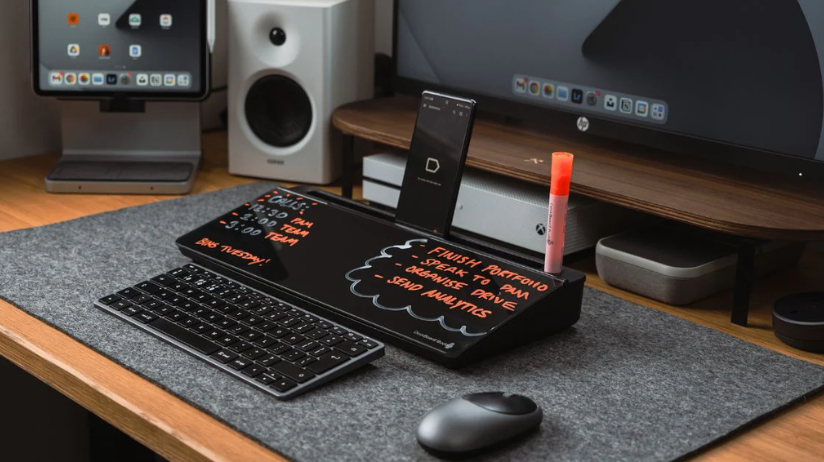
DeskBoard Buddy is a smooth glass writing board that sits right on your desk. You can write reminders, ideas, or tasks directly on it and wipe it clean anytime. The board is slightly tilted, making it easy and comfortable to write on throughout the day.
It also includes a hidden storage space where you can keep small items like pens and cables. A built-in stand holds your phone or tablet so you can see your screen easily while working. Some versions even offer a calculator or wireless charging for extra convenience.
The following are the main features of DeskBoard Buddy.
- Glass dry-erase writing surface.
- Comfortable angled design.
- Hidden storage compartment.
- Phone and tablet stand.
- Optional calculator or wireless charger.
Step-by-Step Guide for Desk Organization with DeskBoard Buddy
Organizing a desk does not need to be difficult. Small changes can make a big difference. Follow these simple steps to create a clean workspace.
Clear Your Surface
Start by removing everything from your desk. Wipe it clean and only place back the items you truly use every day. This helps your desk look open and fresh.
Put DeskBoard Buddy in the Perfect Spot
Place DeskBoard Buddy near your computer screen or main working area. This way, you can easily see your notes and reminders without moving around too much.
Use the Dry-Erase Surface for Daily Planning
You can add reminders like drinking water or taking breaks. Seeing your tasks clearly helps you stay focused. Instead of sticky notes everywhere, use your DeskBoard Buddy as your daily command center.
Use the Internal Storage for Various Items
Keep small items inside the storage space. Store pens, markers, earphones, and cables neatly. This keeps your desk looking clean while everything stays easy to reach.
Use the Built-In Stand for Devices
Place your phone or tablet on the stand so you can see it easily when needed. This helps reduce unnecessary scrolling and keeps your desk organized.
A clean desk helps create a positive work environment. When your workspace feels organized, your mind feels lighter and more focused. Simple habits and the right tools can make your daily work enjoyable. Organizing your desk is the first step toward organizing your day. With DeskBoard Buddy, you are not just creating space; you are building a system that supports your success.
DeskBoard Buddy has an affiliate program, and we are affiliated with them. As an affiliate partner, we’re excited to share this information with you. When you click the following link, you may get discounts on your purchase. We may earn a small commission at no extra cost to you.
Stay tuned to VibenVenture to explore more about DeskBoard Buddy.
Experience Real Value with the Smart and Spacious LG UA77 TV
By Admin
Published on 2025-08-11 12:56:00

From 43 to 86 inches, the LG UA77 TV series brings 4K quality, smart features, and surprisingly strong value to living rooms of all sizes.
When a TV series checks every box, picture quality, smart features, design flexibility, and pricing that doesn’t feel outrageous, it deserves a closer look. The LG UA77 series delivers on all of that across its lineup, ranging from 43 inches to 86 inches. Whether it's a space-saving bedroom upgrade or a full-scale home theater centerpiece, this lineup combines smart usability with surprising depth.
And that’s what makes it stand out. While many TVs today are either too feature-packed or too stripped down, the UA77 finds a practical middle ground, not too expensive, not too basic, and versatile enough to fit into a variety of living spaces. With LG's attention to design, webOS enhancements, and personalized viewing options, this isn’t just another mid-range release, it’s a full series worth taking seriously.
So What Is the LG UA77 Series All About?
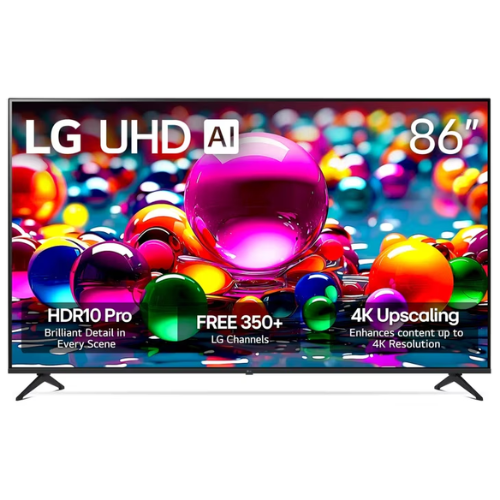
The UA77 series is part of LG Electronics appliances portfolio for 2025 and carries the brand’s updated AI-powered Alpha 7 Gen8 processor, offering intelligent 4K upscaling and visual clarity across every screen size. That means even on the smaller models like the 43" or 50", you’ll notice the same processing benefits you’d get on the massive 86".
It’s a direct LED 4K LG TV line, delivering realistic color and contrast without relying on the premium OLED price tag. With HDR10 Pro, visuals are sharp and dynamic whether you're watching during the day or with the lights off.
One of the most defining aspects of this series is its webOS 25 interface. It’s not just functional, it’s actually user-friendly. There’s no digging through layered menus. Everything from Netflix and YouTube to your LG Channels or Xbox Cloud Gaming is just a few taps away. And speaking of LG Channels, yes, over 350 free options built-in, including movies, shows, news, and more, without needing to log into anything.
The UA77 Sizes: Why Flexibility Matters
The LG UA77 TV lineup is offered in a wide range of sizes:
- 43"
- 50"
- 55"
- 65"
- 75"
- 86"
Each one includes the same processor, webOS system, and HDR10 Pro features. So it’s not about which model is better but what fits best. For smaller apartments or bedroom walls, the 43” and 50” models deliver a seamless fit without compromise. For open spaces or larger families who like hosting movie nights, the 75” and 86” deliver that immersive, edge-to-edge experience.
And here’s where it gets even better: every size is currently priced lower than the average for its tier. The 43" model, for example, has dipped under $230 during streaming week promotions, while the massive 86" recently hit $899, well below its original $1,099 price tag. That kind of pricing-to-feature ratio is rare, especially from a brand as recognizable as LG.
Design and Display That Keep Things Simple
The UA77 is built with function-first intent. Slim bezels and a sleek matte black finish make it blend into nearly any setting, from minimalist dens to busy family living rooms. The TV stand is sturdy and stable, though wall-mounting is definitely an option, especially for the bigger models.
Display-wise, colors are vivid and motion handling is decent for a 60Hz native refresh rate. While it won’t deliver the silky smooth frame rates of high-end gaming monitors, most viewers won’t notice unless playing ultra-fast, competitive titles. For casual gameplay, sports streaming, binge watching, and movie marathons, the experience is consistently impressive.
Personalized Viewing with LG’s Picture & Sound Wizard
The UA77 lineup includes LG’s Picture & Sound Wizard, a feature that learns your preferences. Instead of sifting through confusing audio settings or color profiles, the TV adjusts based on what you like. Whether that’s warm tones for movies or a more vibrant look for sports, the AI quietly tweaks settings behind the scenes.
You’ll also find Filmmaker Mode available, which automatically disables motion smoothing and preserves the director’s original intent, color, lighting, frame rate, all as it was meant to be viewed.
Gaming on UA77: What You Get
This isn’t a gaming powerhouse, but for most casual and mid-level players, it holds its own. The addition of FreeSync, VRR (Variable Refresh Rate), and Game Optimizer make it a reliable option for console play. Plus, it supports Xbox Cloud Gaming and GeForce NOW, turning your TV into a cloud-powered gaming hub.
Input lag is minimal, and HDMI 2.0 ports offer enough support for modern consoles and sound systems. Gamers who aren’t chasing elite-level refresh rates will still find plenty to love here, especially in the 65" and 75" formats.
Streaming Features That Actually Feel Useful
A big win here is LG’s built-in streaming ecosystem. With webOS, you get easy access to all major streaming platforms, Netflix, Hulu, Disney+, Prime Video, YouTube TV without needing external devices.
The LG Channels feature unlocks more than 350 free streaming channels, everything from indie films and international shows to local news and live sports. If you’re on a budget or just don’t want to juggle subscriptions, it’s a welcome addition.
Apple users can cast directly with AirPlay 2, while Android fans can take advantage of Google Cast. Either way, your phone content gets mirrored quickly and cleanly on the big screen.
Comparisons That Matter
Looking at other LG TV reviews, the UA77 holds its own as the best LG TV in the budget-to-midrange category. The C4 OLED is top-tier and gorgeous, but it comes at a premium. Meanwhile, Samsung’s competing Crystal UHD lineup (like the CU8000) and TCL’s 5-Series offer similar specs but the UA77 often undercuts them in price while matching or exceeding visual performance, particularly in color richness and user interface.
What does LG stand for here? A balanced approach. Not the flashiest, not the cheapest but impressively consistent. Especially in this UA77 series, the focus is on value, simplicity, and usability.
Warranties and Coverage
Each TV comes with a 1-year manufacturer’s warranty, but LG also offers its Premium Care plan through Asurion. This adds coverage beyond the basics, including surge protection and service with no hidden fees or deductibles. It’s optional, but worth considering if you’re investing in one of the larger models.
Pricing Snapshot
Here’s a quick look at recent sale pricing for the full UA77 series:
- 43” – $229.99
- 50” – $279.99
- 55” – $299.99
- 65” – $399.99
- 75” – $599.99
- 86” – $899.99
These are sale prices, so they may shift depending on stock and timing. But for a brand like LG Electronics, these numbers are impressively accessible especially when combined with occasional LG electronics promo code offers available through third-party retailers.
You don’t have to overspend to get a modern 4K TV experience that actually feels like an upgrade. The LG UA77 series hits the mark for those wanting real-world usability, solid visual performance, and built-in features that reduce the need for extras. It doesn’t pretend to be something it’s not, it just does the basics extremely well and then adds a few perks to keep things interesting. For anyone browsing LG TV reviews, this is a standout worth bookmarking.
Follow VibenVenture for more on the best electronics for your home.
Related
Coffee Tables That Will Instantly Enhance Your Living Space

Make Room for Style With These Furniture Swaps That Change Everything

Is the Toybox 3D Printer Worth It for Kids & Creators

Memorialize: The Only Way to Get a Complete Family Picture
